Laravel Development
Why Your API Creates Duplicate Orders When Users Click Submit Twice (And How to Prevent It)
What happens when a customer clicks Place Order twice? Duplicate records, repeated payments and unexpected backend errors can damage user trust. Learn how to prevent duplicate API requests in Laravel using idempotency keys, database constraints, atomic cache locks and transactions, with practical PHP examples and Postman testing.
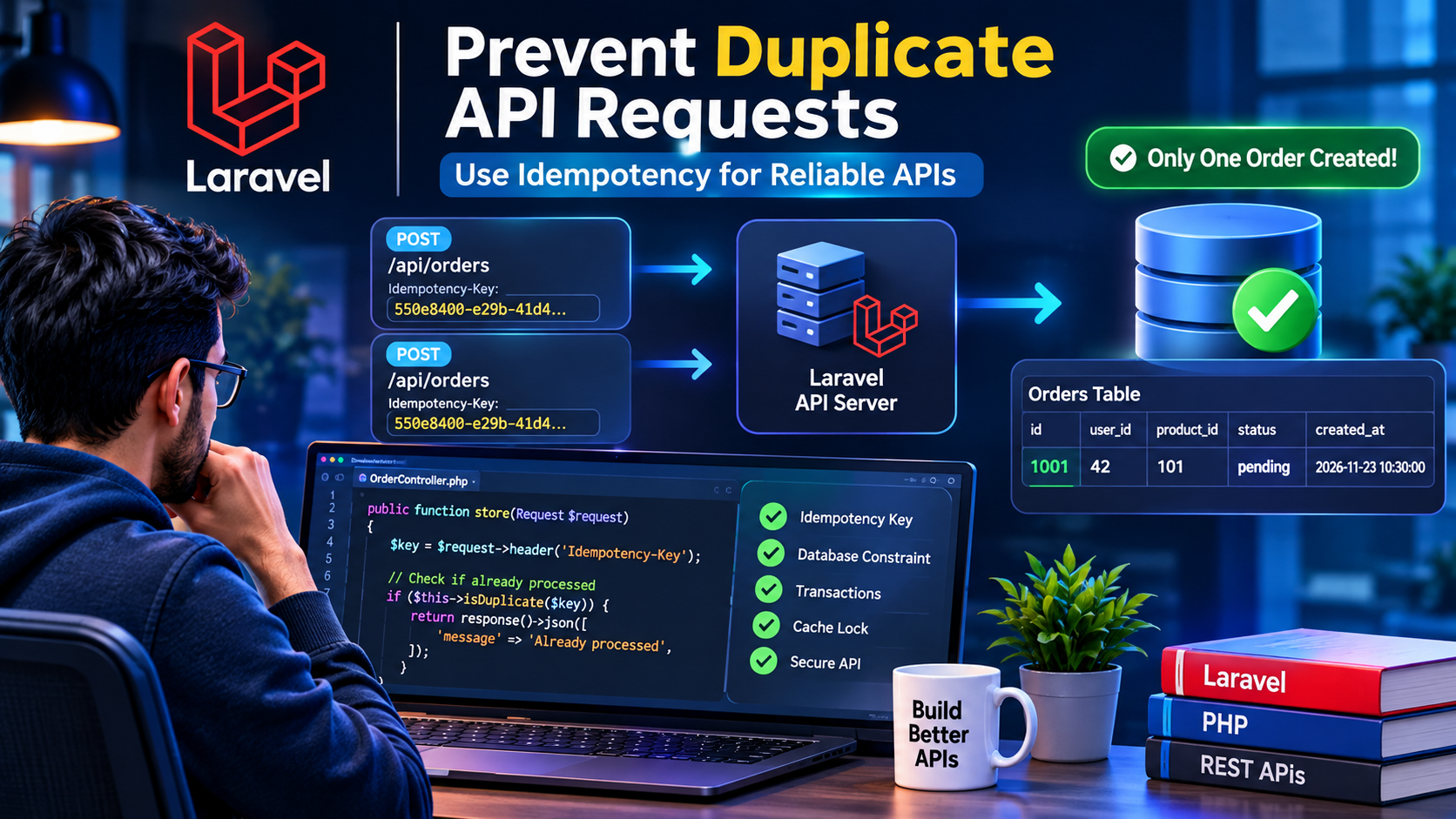
What you'll learn
Understand the double-submit problem, implement idempotency in Laravel, protect concurrent requests and test retry behavior with Postman.
Imagine a customer is purchasing something from your website.
They select a product, enter their details and click the Place Order button.
Nothing happens immediately.
The page appears frozen, so they click the button again.
A few seconds later, they receive two order confirmation emails. When they check their account, they discover that two identical orders have been created.
Sounds familiar?
This is one of those problems that developers often overlook while building applications. Everything works perfectly during normal testing, but real users behave differently. They click buttons repeatedly, refresh pages, experience slow internet connections and retry requests when something goes wrong.
The problem isn't necessarily your frontend.
It may be your API architecture.
In this tutorial, we'll understand why duplicate requests happen, how they affect applications and how to prevent duplicate operations using Laravel, PHP and MySQL.
We'll build our understanding around a practical e-commerce example.
1. Why Do Duplicate API Requests Happen?
Let's start with a simple API endpoint:
HTTPPOST /api/orders
Its responsibility is to create a new order whenever a customer submits the checkout form.
A normal request might look like this:
JSON{
    "product_id": 101,
    "quantity": 2,
    "total": 1500
}
Your backend receives the request, validates the data and inserts a new order into the database.
Everything looks fine.
But what happens when the same request reaches your server twice?
TEXTCustomer clicks Place Order
          |
          v
    POST /api/orders
          |
          v
    Laravel processes request
          |
          v
    Order #1001 created
          |
          v
Customer clicks again
          |
          v
    POST /api/orders
          |
          v
    Laravel processes request
          |
          v
    Order #1002 created
The backend sees two requests and, unless you have implemented additional protection, it may create two orders.
There are several reasons this can happen:
- Users double-click buttons.
- Slow internet connections create uncertainty.
- Browser requests are automatically retried.
- Mobile applications resend requests after network interruptions.
- JavaScript accidentally triggers multiple submissions.
- Payment gateways send webhook notifications more than once.
- Multiple requests reach the server simultaneously.
The important thing to understand is that your API cannot assume every incoming request represents a completely new user action.
2. Why Disabling the Submit Button Is Not Enough
Many developers initially solve this problem using JavaScript.
For example:
JAVASCRIPTconst button = document.querySelector('#placeOrder');

button.addEventListener('click', async () => {
    button.disabled = true;

    await fetch('/api/orders', {
        method: 'POST',
        headers: {
            'Content-Type': 'application/json'
        },
        body: JSON.stringify({
            product_id: 101,
            quantity: 2
        })
    });
});
This is useful because it prevents some accidental repeated clicks.
However, it does not guarantee that duplicate orders cannot be created.
Why?
Because frontend protection only controls the behavior of that particular browser interface.
It cannot prevent:
- Another browser tab from sending the request.
- A mobile application from retrying the request.
- An API client such as Postman from sending duplicate requests.
- An attacker from manually sending repeated requests.
- Two requests that have already reached the server.
This is why important operations must also be protected on the backend.
Your frontend should improve the user experience, but your backend must enforce correctness.
3. What Is API Idempotency?
This is where an important API design concept comes into the picture: Idempotency.
In simple language, idempotency means that repeating the same operation with the same identifier should not create the same result multiple times.
Imagine a customer sends this request:
HTTPPOST /api/orders
Idempotency-Key: 550e8400-e29b-41d4-a716-446655440000
The first request creates an order.
If the customer sends the same request again with the same idempotency key, the server recognizes that it has already processed that operation.
Instead of creating another order, it returns the previously stored result.
For example:
First request:
JSON{
    "success": true,
    "message": "Order created successfully",
    "order_id": 1001
}
Second request using the same key:
JSON{
    "success": true,
    "message": "Order created successfully",
    "order_id": 1001
}
Notice something important?
Both requests return the same order ID.
Only one order is created.
If the customer starts a completely new checkout operation, the frontend generates a new idempotency key.
This allows your application to distinguish between a retry and a genuinely new operation.
4. How Does an Idempotency Key Work?
An idempotency key is a unique identifier generated by the client for a particular operation.
A UUID is a convenient choice.
For example:
JAVASCRIPTconst idempotencyKey = crypto.randomUUID();

console.log(idempotencyKey);
Example output:
TEXT550e8400-e29b-41d4-a716-446655440000
The frontend sends this value with the API request.
JAVASCRIPTfetch('/api/orders', {
    method: 'POST',

    headers: {
        'Content-Type': 'application/json',
        'Idempotency-Key': idempotencyKey
    },

    body: JSON.stringify({
        product_id: 101,
        quantity: 2
    })
});
The backend then follows a simple process:
- Receive the idempotency key.
- Check whether the key has already been processed.
- If it has, return the previously stored response.
- If it is new, acquire protection against concurrent processing.
- Create the order.
- Store the operation result.
- Return the response to the customer.
One important detail: the frontend must reuse the same key when retrying the same operation. Generating a new key for every retry defeats the purpose.
5. Let's Implement This in Laravel
Now let's move from theory to implementation.
We'll create a simple Laravel order API with:
- An orders table.
- An idempotency records table.
- A unique database constraint.
- Laravel cache locks.
- Database transactions.
The example assumes a Laravel application with authentication and a shared cache backend such as Redis.
Step 1: Create the Idempotency Table
First, generate a migration:
BASHphp artisan make:migration create_idempotency_records_table
Open the generated migration and add:
PHPuse Illuminate\Database\Migrations\Migration;
use Illuminate\Database\Schema\Blueprint;
use Illuminate\Support\Facades\Schema;

return new class extends Migration
{
    public function up(): void
    {
        Schema::create('idempotency_records', function (Blueprint $table) {
            $table->id();

            $table->foreignId('user_id')
                ->constrained()
                ->cascadeOnDelete();

            $table->string('key', 100);

            $table->string('request_hash', 64);

            $table->unsignedSmallInteger('response_status')
                ->nullable();

            $table->json('response_body')->nullable();

            $table->timestamps();

            $table->unique(
                ['user_id', 'key'],
                'idempotency_user_key_unique'
            );
        });
    }

    public function down(): void
    {
        Schema::dropIfExists('idempotency_records');
    }
};
Why do we need this table?
It stores information about operations that have already been processed.
| Column | Purpose |
|---|---|
| user_id | Identifies the customer |
| key | Unique operation identifier |
| request_hash | Identifies the original request payload |
| response_status | Stores the original HTTP status |
| response_body | Stores the original response |
The unique constraint on user_id and key is particularly important.
It prevents the database from accepting multiple records for the same user's idempotency key.
Run the migration:
BASHphp artisan migrate
Step 2: Create the Orders Table
If your application does not already have an orders table, create one:
BASHphp artisan make:migration create_orders_table
Example migration:
PHPSchema::create('orders', function (Blueprint $table) {
    $table->id();

    $table->foreignId('user_id')
        ->constrained()
        ->cascadeOnDelete();

    $table->unsignedBigInteger('product_id');

    $table->unsignedInteger('quantity');

    $table->decimal('total', 12, 2);

    $table->string('status')->default('pending');

    $table->timestamps();
});
For a real application, also add the appropriate foreign key relationship to your products table.
Run:
BASHphp artisan migrate
Step 3: Create the API Route
Open:
TEXTroutes/api.php
Add:
PHPuse App\Http\Controllers\OrderController;
use Illuminate\Support\Facades\Route;

Route::middleware('auth:sanctum')->post(
    '/orders',
    [OrderController::class, 'store']
);
This example uses Laravel Sanctum for API authentication.
The authenticated user will own the order and its idempotency record.
Step 4: Implement Idempotency in the Controller
Create the controller:
BASHphp artisan make:controller OrderController
Now add the following implementation:
PHP<?php

namespace App\Http\Controllers;

use App\Models\Order;
use Illuminate\Http\Request;
use Illuminate\Support\Facades\Cache;
use Illuminate\Support\Facades\DB;
use Illuminate\Support\Facades\Validator;

class OrderController extends Controller
{
    public function store(Request $request)
    {
        $validator = Validator::make(
            $request->all(),
            [
                'product_id' => ['required', 'integer'],
                'quantity' => ['required', 'integer', 'min:1'],
            ]
        );

        if ($validator->fails()) {
            return response()->json([
                'success' => false,
                'errors' => $validator->errors(),
            ], 422);
        }

        $key = $request->header('Idempotency-Key');

        if (! $key || ! preg_match(
            '/^[a-zA-Z0-9._-]{16,100}$/',
            $key
        )) {
            return response()->json([
                'success' => false,
                'message' => 'A valid Idempotency-Key is required.',
            ], 400);
        }

        $user = $request->user();

        $payload = $validator->validated();

        $requestHash = hash(
            'sha256',
            json_encode($payload, JSON_THROW_ON_ERROR)
        );

        // Scope the lock to the authenticated user and key.
        $lockName = 'idempotency:' . hash(
            'sha256',
            $user->id . ':' . $key
        );

        $lock = Cache::lock($lockName, 30);

        // Another request using this key may already be processing.
        if (! $lock->get()) {
            return response()->json([
                'success' => false,
                'message' => 'This request is already being processed.',
                'retryable' => true,
            ], 409);
        }

        try {
            $existing = DB::table('idempotency_records')
                ->where('user_id', $user->id)
                ->where('key', $key)
                ->first();

            if ($existing) {
                if (! hash_equals(
                    $existing->request_hash,
                    $requestHash
                )) {
                    return response()->json([
                        'success' => false,
                        'message' => 'This idempotency key was already used with different request data.',
                    ], 409);
                }

                if ($existing->response_body === null) {
                    return response()->json([
                        'success' => false,
                        'message' => 'The original request is still processing.',
                    ], 409);
                }

                return response()->json(
                    json_decode(
                        $existing->response_body,
                        true
                    ),
                    $existing->response_status
                );
            }

            $result = DB::transaction(function () use (
                $user,
                $key,
                $requestHash,
                $payload
            ) {
                // Claim the idempotency key.
                $recordId = DB::table('idempotency_records')
                    ->insertGetId([
                        'user_id' => $user->id,
                        'key' => $key,
                        'request_hash' => $requestHash,
                        'created_at' => now(),
                        'updated_at' => now(),
                    ]);

                // In a real application, calculate the price
                // from trusted database product data.
                $order = Order::create([
                    'user_id' => $user->id,
                    'product_id' => $payload['product_id'],
                    'quantity' => $payload['quantity'],
                    'total' => 1500,
                    'status' => 'pending',
                ]);

                $body = [
                    'success' => true,
                    'message' => 'Order created successfully.',
                    'order_id' => $order->id,
                ];

                DB::table('idempotency_records')
                    ->where('id', $recordId)
                    ->update([
                        'response_status' => 201,
                        'response_body' => json_encode(
                            $body,
                            JSON_THROW_ON_ERROR
                        ),
                        'updated_at' => now(),
                    ]);

                return [
                    'body' => $body,
                    'status' => 201,
                ];
            });

            return response()->json(
                $result['body'],
                $result['status']
            );

        } finally {
            $lock->release();
        }
    }
}
Important implementation notes
This is an educational starting implementation, not a complete payment-processing system.
The shared cache lock serializes requests using the same key, while the database unique constraint provides an additional safeguard.
The lock must be shared across application servers, not stored independently on each server. Its lifetime must also be sufficient for the operation.
For a production implementation, handle database unique-constraint races explicitly, define a retention policy for idempotency records, and test concurrent requests against your actual database and cache driver.
Also make sure your Order model allows the fields used in Order::create() through its $fillable configuration.
Step 5: Why Do We Need Database Transactions?
You might be wondering why the implementation uses:
PHPDB::transaction(function () {
    // Create order and save idempotency result.
});
Imagine the following situation:
- Your application creates an order.
- The server crashes before saving the idempotency response.
- The customer retries the request.
- Your application cannot find the previous response.
- Another order might be created.
This is why the order creation and idempotency result should be committed together.
If an exception occurs before the transaction commits, the database rolls back both changes.
This keeps the order and its recorded result consistent.
Laravel automatically commits a successful transaction and rolls it back when an exception is thrown.
Step 6: Test Your API Using Postman
Now let's test the implementation.
Send a POST request:
HTTPPOST http://127.0.0.1:8000/api/orders
Add these headers:
HTTPAccept: application/json
Content-Type: application/json
Authorization: Bearer YOUR_ACCESS_TOKEN
Idempotency-Key: order-checkout-123456789
Request body:
JSON{
    "product_id": 101,
    "quantity": 2
}
Test 1: First request
Expected response:
JSON{
    "success": true,
    "message": "Order created successfully.",
    "order_id": 1001
}
HTTP status:
TEXT201 Created
Test 2: Send the exact same request again
Use the same idempotency key.
Expected result:
JSON{
    "success": true,
    "message": "Order created successfully.",
    "order_id": 1001
}
The same order ID is returned.
No second order is created.
Test 3: Change the request but keep the same key
For example:
JSON{
    "product_id": 101,
    "quantity": 5
}
Keep the original idempotency key.
Expected result:
JSON{
    "success": false,
    "message": "This idempotency key was already used with different request data."
}
HTTP status:
TEXT409 Conflict
Test 4: Generate a new key
Send the new request with a different idempotency key.
The application should treat it as a new operation and create another order.
This demonstrates the basic behavior of idempotency.
7. What About Payment Processing?
Preventing duplicate orders is only one part of the problem.
Payment processing requires additional care.
Imagine a customer makes a payment, but their internet connection drops before the website receives the payment confirmation.
The customer refreshes the page and tries again.
If your application creates another payment request without protection, the customer might be charged twice.
For payment operations, use the payment provider's own idempotency mechanism whenever available.
For example, Stripe supports idempotency keys for API requests.
A reliable payment architecture should:
- Generate a unique key for the payment operation.
- Store the payment operation in your database.
- Send the key to the payment provider.
- Reuse the same provider key when retrying that payment.
- Verify payment status using the provider's response.
- Process webhook events safely, including repeated deliveries.
- Keep order and payment statuses consistent.
Never assume that a failed HTTP response means a payment was not processed.
The payment provider may have completed the operation even if your application never received the response.
Also, avoid holding a database transaction open while waiting for an external payment provider. Use a suitable payment state machine and asynchronous processing strategy instead.
8. When Should You Use Idempotency?
Idempotency is especially useful when an API performs operations that should not happen repeatedly.
Some practical examples include:
| Application | Operation to protect |
|---|---|
| E-commerce | Creating orders |
| Payment gateway | Charging customers |
| Booking platform | Reserving seats |
| Registration system | Creating accounts |
| Subscription platform | Creating subscriptions |
| Inventory system | Processing stock movements |
| Banking application | Transferring money |
Not every API endpoint needs an idempotency key.
For example, a simple GET request that retrieves a product list generally does not need this additional mechanism.
Focus on operations that create records, transfer money, reserve resources or trigger important external actions.
9. Production Checklist: Before Releasing Your API
Before deploying an API that handles important user operations, review these points:
- [ ] Generate one idempotency key per logical operation.
- [ ] Reuse the same key when retrying.
- [ ] Scope keys to the authenticated user or API client.
- [ ] Store request hashes to detect changed payloads.
- [ ] Add a unique database constraint.
- [ ] Use shared atomic locks for concurrent processing.
- [ ] Use database transactions for related database changes.
- [ ] Handle requests that are already processing.
- [ ] Store and replay the original response.
- [ ] Define an idempotency-record retention policy.
- [ ] Protect external payment operations separately.
- [ ] Make webhook processing safe against repeated events.
- [ ] Test simultaneous requests, not just sequential requests.
- [ ] Monitor duplicate-key conflicts and failed operations.
These practices help make your backend more reliable as your application grows.
Frequently Asked Questions
What is an idempotency key in an API?
An idempotency key is a unique identifier sent with a request so that the backend can recognize retries of the same logical operation and avoid creating duplicate results.
Can JavaScript prevent duplicate API requests?
JavaScript can disable buttons and prevent some accidental submissions. However, backend protection is still necessary because requests can be repeated through other clients, browser tabs or network retries.
Does Laravel support idempotency automatically?
Laravel provides useful building blocks such as database transactions, cache locks and database constraints. You can combine these features to implement idempotency for your application's requirements.
What happens when two identical requests arrive simultaneously?
Both requests may reach the server before either has completed. A shared atomic lock can serialize their processing, while a database unique constraint provides additional protection against duplicate key records.
Should every POST request have an idempotency key?
No. Use idempotency where repeating an operation could create unwanted side effects, such as duplicate orders, payments or bookings.
Is an idempotency key the same as authentication?
No. Authentication identifies who is making a request. An idempotency key identifies a particular logical operation. You need both where appropriate.
Final Thoughts
Duplicate API requests may look like a small problem, but they can create serious issues in real applications.
A customer might receive two orders, a booking system might reserve the same resource twice, or a payment system might process an operation more than once.
The solution isn't simply to tell users not to click twice.
A reliable application must be designed to handle repeated requests safely.
By combining idempotency keys, Laravel cache locks, database constraints and transactions, developers can build APIs that behave more predictably even when users have slow connections or applications retry requests.
Remember one thing:
A good API should not depend on users behaving perfectly. It should be designed to handle real-world behavior.
Keep learning, keep building and make your applications more reliable.
Official Documentation and Further Reading
- Laravel Database Transactions
- Laravel Cache Atomic Locks
- Laravel Database Migrations
- Stripe Idempotent Requests
- HTTP Semantics â RFC 9110
This tutorial is intended for educational purposes. Test concurrency handling, database constraints and payment workflows in a staging environment before using them in production.
On this page
Build better APIs.
Explore practical programming guides and developer resources on KodingKaro.
Explore more articles â